



I have spent decades testing personal finance software, watching tools launch with flashy venture capital, sputter out, and abruptly shut down—leaving users scrambling to salvage ten years of exported CSV files.
Quicken has outlived them all. With more than 20 million customers managing over $2.4 trillion in wealth, it remains the incumbent giant of American personal finance. But surviving four decades since the MS-DOS era doesn’t make software immune to criticism.
Between the legacy Windows desktop codebase, a Mac version that still plays second fiddle, and Simplifi—their modern, cloud-based shot across the bow at Monarch and YNAB—Quicken is currently two completely different companies wearing the same trench coat. I spent weeks syncing bank accounts, running multi-asset portfolio reports, splitting messy receipts, and enduring the occasional aggregator hiccup to find out which version is worth your money—and who should run the other way.
1. The Quick Verdict
The Bottom Line: Is Quicken worth it?
Yes, Quicken is worth it if you demand offline data ownership or track complex investment portfolios. Quicken Classic remains the undisputed heavyweight for balance-sheet management, while Simplifi beats most modern apps at forward cash-flow forecasting. Just prepare for dated interfaces and steep second-year renewal hikes.
- Overall Score: 4.2 / 5
- Investment & Tax Depth: 4.5 / 5
- Modern Interface & Ease of Use: 4.0 / 5
- Pricing & Long-Term Value: 3.9 / 5
Quick Recommendations
- Best for pure cash flow & mobile budgeting: Quicken Simplifi
- Best for long-term data hoarders & net worth tracking: Quicken Classic Deluxe
- Best for complex portfolios & retirement modeling: Quicken Classic Premier
- Best for freelancers and small landlords (Windows only): Quicken Classic Business & Personal
The Good
- Local database storage on Classic means you actually own your .QDF financial data file.
- Classic Deluxe and above include a Data Access Guarantee; let your subscription expire, and your manual data isn’t held hostage behind a paywall.
- Simplifi offers true Time-Weighted Return (TWR) and Internal Rate of Return (IRR) metrics without forcing you to build manual Excel formulas.
- Reporting depth is unrivaled. You can slice decades of spending across categories, tags, and tax schedules.
The Bad
- Classic’s interface looks and feels like it was designed during the Windows 7 administration.
- Quicken charges you as an upfront annual lump sum—there is no genuine month-to-month billing.
- Mac users paying for Business & Personal get shortchanged: the macOS version completely strips out the dedicated Rental Property Manager module and lacks Accounts Payable (A/P) workflows for tracking vendor bills.
- Aggregator disconnects still happen. When Plaid or Finicity drops an authentication token, expect to spend twenty minutes re-linking accounts.
2. Quicken Pricing: Tiers, Renewals, and the Fine Print
Quicken’s marketing page presents prices as monthly bites—”$3.99 a month” or “$6.99 a month.” Don’t let that fool you. You cannot pay month-to-month. Every plan is billed upfront as a 12-month commitment.
Worse, the initial price you see on Quicken’s site is almost always an introductory discount for first-time buyers. Come year two, your credit card will silently auto-renew at the full standard rate, which can jump by as much as 40% to 75% depending on the tier. Here is what you actually pay, stripped of promotional misdirection:
| Plan & Platform | Pricing (Year 1 / Renewal) | Best For | The Catch |
|---|---|---|---|
| Quicken Simplifi Cloud (Web, iOS, Android) |
$3.99/mo ($47.88/yr) Renews at $6.99/mo ($83.88/yr) |
Modern cash flow, daily spending alerts, hands-off budgeters | Cancel and you lose access to your dashboard and historical data immediately. |
| Quicken Business & Personal [NEW] Cloud (Web, iOS, Android) |
$4.99/mo ($59.88/yr) Renews at $8.99/mo ($107.88/yr) |
Freelancers, 1099 contractors, side-hustlers managing up to 10 gigs | Lightweight bookkeeping only; lacks double-entry accounting and payroll. |
| Quicken Classic Deluxe Desktop (Windows, Mac Local) |
$5.99/mo ($71.88/yr) Renews at $6.99/mo ($83.88/yr) |
Long-term ledger tracking, custom reporting, manual entry | Interface feels decades old; companion mobile app is merely a clunky sync viewer. |
| Quicken Classic Premier Desktop (Windows, Mac Local) |
$7.99/mo ($95.88/yr) Renews at $8.99/mo ($107.88/yr) |
Serious retail investors, tax-loss harvesting, bond tracking | The best tools (like Morningstar Portfolio X-Ray) are strictly walled off on Windows. |
| Quicken Classic Business & Personal Desktop (Windows, Mac Local) |
$10.99/mo ($131.88/yr) Renews at $12.49/mo ($149.88/yr) |
Sole proprietors, small-scale landlords tracking tenant rent rolls | Rental Property Manager is missing on macOS; not a true QuickBooks multi-user replacement. |
The Auto-Renewal Trap and Refund Reality
Quicken operates on a 30-day money-back guarantee. If you purchase directly through Quicken.com, you have exactly 30 days from purchase—or 30 days from the moment an annual auto-renewal charge lands on your bank statement—to submit their online refund request form. In our experience, they do honor it without endless customer-support interrogations, but shipping costs on physical backup media are non-refundable.
Two critical warnings if you buy:
- App Store Purchases Are Locked In: If you purchase Simplifi through Apple’s App Store or Google Play to save three clicks, Quicken cannot refund your money. You are completely at the mercy of Apple or Google’s automated, notoriously stingy refund algorithms. Buy directly through their site instead.
- Cancellation Mid-Term: If you realize at month four that you hate the software, there is no prorated refund. Quicken will simply toggle off auto-renewal and let your access run down until day 365. Keep a calendar alert set for 11 months after purchase so you can decide whether to stay before the higher standard renewal rate kicks in.
3. Simplifi vs. Classic: Two Completely Different Animals
Let’s clear up the biggest point of confusion that Quicken’s marketing team actively muddies: Quicken Simplifi is not “mobile Quicken Classic.”
They are entirely different software platforms built on completely different codebases by different engineering teams. They share a parent company, a brand name, and virtually nothing else. If you buy the wrong one, you will be miserable.
Quicken Simplifi: The Cloud Contender for Mint Refugees
Simplifi was built from scratch to fight modern web-first platforms like Monarch Money and Copilot. It lives entirely in the cloud. You log in through Chrome, Safari, or your phone, and all your data sits on Quicken’s servers.
The software is designed for hands-off tracking. It aggregates your accounts using Plaid, Finicity, and MX, automatically slaps categories on transactions, and funnels everything into an automated cash-flow forecast. If you spent the last ten years using the free version of Mint just to see where your money went last Tuesday, Simplifi is the natural, modern successor.
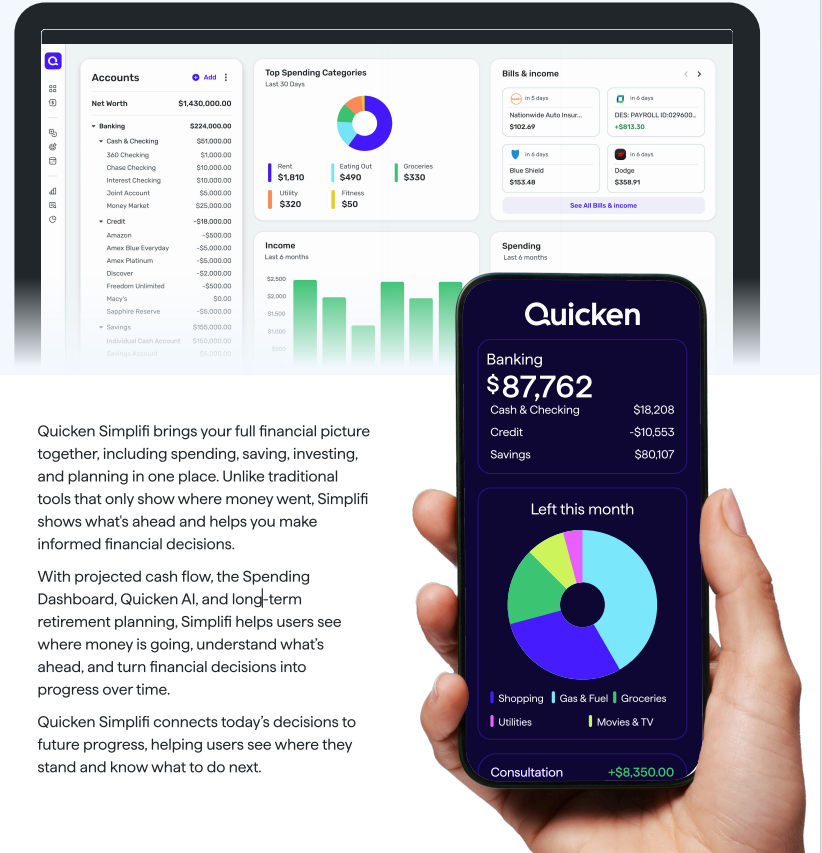
The downside is the standard SaaS trap: if you cancel your subscription, the party is over. You cannot log in to view your multi-year net worth graphs or your historical spending data. You export your numbers to a CSV file beforehand, or you lose them.
Quicken Classic: The Offline Accounting Juggernaut
Quicken Classic (Deluxe, Premier, and Business & Personal) is the direct descendant of the software your dad ran on a beige IBM desktop in 1994. It installs locally on your hard drive. Your financial life lives inside a .QDF file on Windows (or an equivalent local database on macOS).
Classic is built for people who want total control over every split penny, real estate investors tracking tenant leases, independent contractors running Schedule C deductions, and retirees nursing complex investment portfolios across four different brokerages. It functions more like a formal double-entry ledger. You reconcile your accounts against your actual monthly bank statements down to the exact cent.
The killer advantage of Classic is the Data Access Guarantee. If Quicken jacks up prices next year and you refuse to renew, the software doesn’t brick itself. Online bank feeds and live quote downloads stop working, and an annoying banner ad eats up 20% of your screen real estate, but your local database remains yours. You can still open your file, enter transactions manually, and run reports on twenty years of data without paying Quicken another dime.
A word of warning: do not buy Quicken Classic if you plan to do your banking primarily on your phone. Quicken offers a “Classic Companion” mobile app, but it is an unstable syncing satellite. During my tests, syncing a heavy desktop file to the companion app created duplicate categories and phantom ledger adjustments. Treat Classic as desktop software, period.
4. Hands-On Feature Analysis: Where Quicken Shines and Stumbles
To put both platforms through their paces, I ran my personal banking, taxable brokerage accounts, retirement funds, and rental income through Quicken for weeks. Here is how the core engines actually perform once the marketing sheen wears off.
Investment Analysis: Classic Dominates, Simplifi Holds Its Own
If you have more than a simple three-fund portfolio at Vanguard, Quicken Classic Premier is in a league of its own among consumer software.
It handles municipal bonds, corporate actions, stock splits, and complex option contracts without throwing an error code. When calculating your actual portfolio performance, Classic calculates true annualized returns using XIRR (Extended Internal Rate of Return), accounting for every irregular deposit, dividend reinvestment, and withdrawal you made over the last decade. Come tax season, the capital gains realization tool lets you model sales using specific tax lots—letting you choose FIFO, LIFO, or Specific ID to squeeze every dollar of tax-loss harvesting out of a down market.
Best of all for US filers: Classic exports clean .TXF files that feed directly into desktop TurboTax. When April 15 rolls around, importing hundreds of complex transactions takes seconds instead of hours of manual entry.
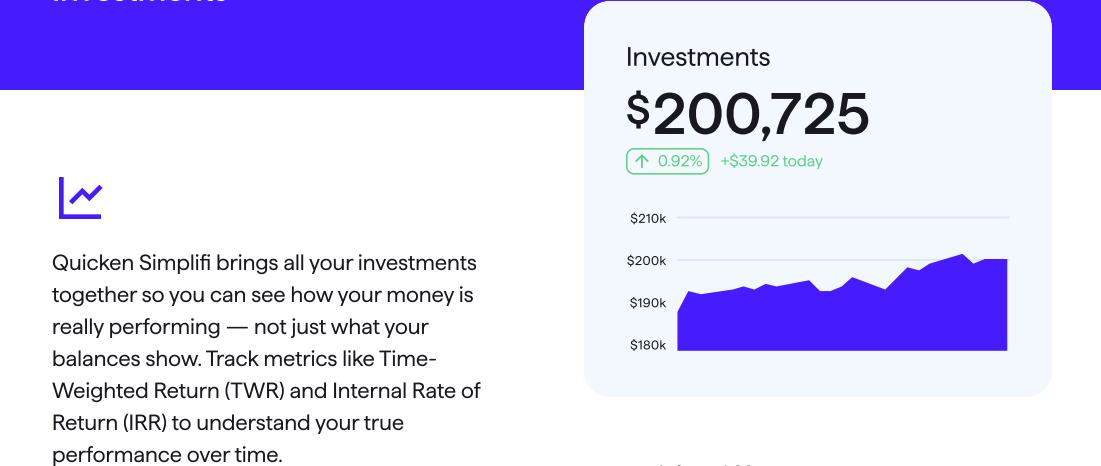
Simplifi takes a different, lighter approach. It won’t let you pick specific tax lots for an options trade, but its investment dashboard is surprisingly competent for a web app. It tracks both Time-Weighted Return (TWR) and Internal Rate of Return (IRR). TWR isolates the pure performance of your underlying stock picks from the timing of your paycheck deposits—a metric almost every other lightweight budgeting app ignores. It gives you a clean view of your asset allocation, but it is an analytical viewer, not an active trading ledger.
Budgeting and Spending: Two Opposing Philosophies
Classic uses traditional monthly category budgets. You tell it you want to spend $600 on groceries, and it gives you a progress bar. It works, but it feels rigid, backwards-looking, and tedious to adjust.
Simplifi runs on what it calls the Spending Plan, and it is one of the best executions of forward-looking cash flow on the market:
Projected Monthly Income – (Fixed Bills + Savings Goals) = Available to Spend
Instead of making you budget $50 for shoes and $40 for dining out, it isolates your fixed obligations first. Whatever remains is your discretionary pile, broken down into a simple “Available per day” figure. If an unexpected $200 dentist bill clears your checking account, your daily spending allowance instantly drops from $65 a day to $58 a day for the rest of the month.
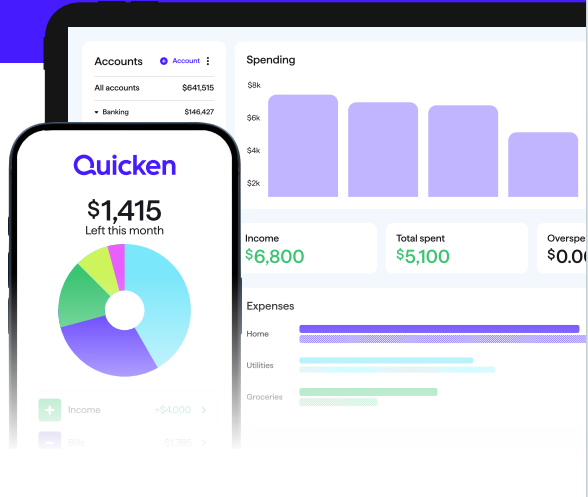
Simplifi also handles rollover spending gracefully. If you budget $150 a month for auto maintenance and spend zero in May, that $150 rolls over into June, accumulating until you actually need an oil change.
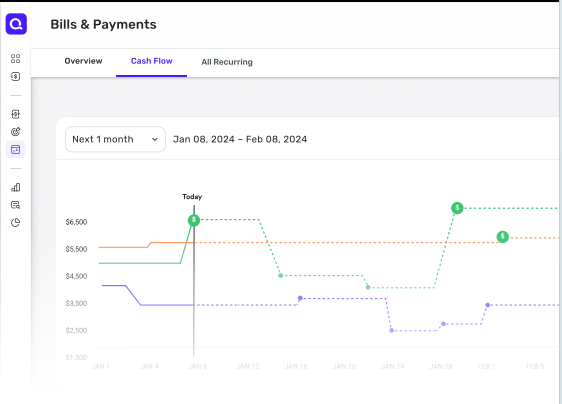
The friction? Irregular paychecks cause chaos. If your employer deposits your end-of-month salary on the 31st instead of the 1st, Simplifi’s algorithm frequently assumes you had double income one month and zero the next, requiring manual date adjustments to keep your Spending Plan from breaking.
Small Business, 1099 Tracking, and Quicken AI: Cloud Agility vs. Desktop Muscle
If you visit Quicken’s homepage today, you will notice a seismic shift: the company is pushing its two cloud-native products front and center—Quicken Simplifi ($3.99/mo promo) and the new Quicken Business & Personal cloud app ($4.99/mo promo, 44% off). The legacy desktop Classic apps are being steadily pushed to the background.
This creates massive confusion because Quicken now sells two completely different Business & Personal products with nearly identical names:
- The New Quicken Business & Personal (Cloud – Web & Mobile): A lightweight, forward-looking app built directly on the modern Simplifi engine for freelancers, sole proprietors, and side-hustlers.
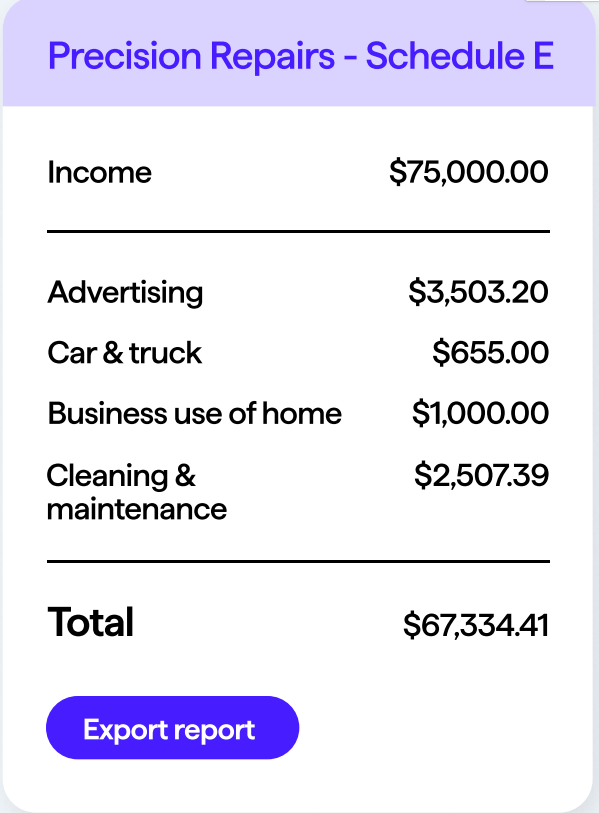
- Quicken Classic Business & Personal (Desktop): The heavy offline powerhouse built for landlords who need local tenant lease and Schedule E rental tracking (Windows only).
The New Cloud Business App: What Actually Works
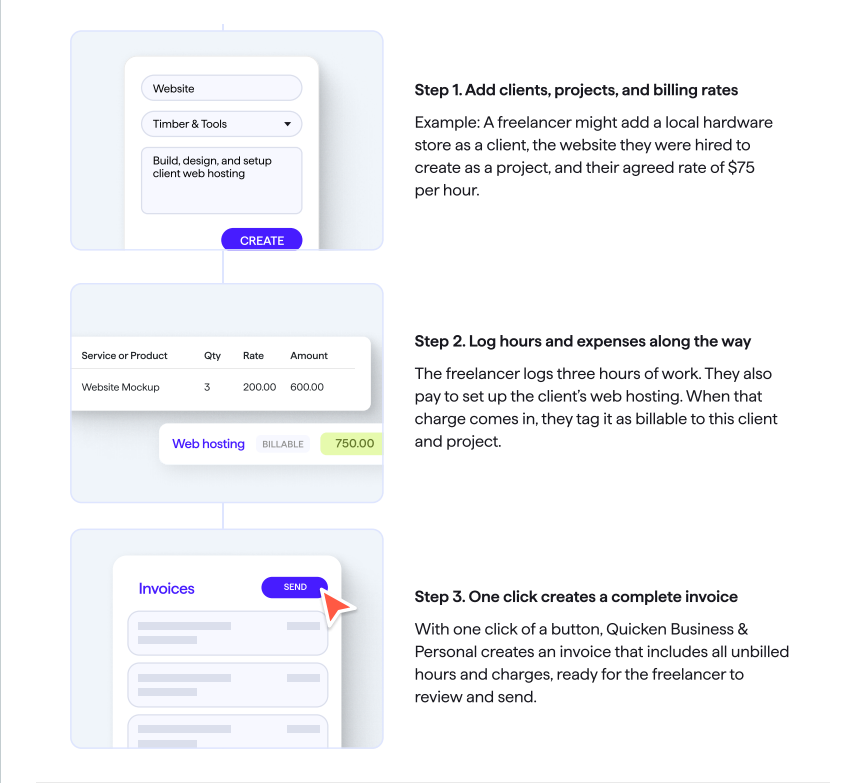
- Manage Up to 10 Gigs on One Bill: While QuickBooks Online charges you an extra monthly fee for every additional company entity, Quicken lets you track up to 10 separate ventures under a single subscription. If you run wedding photography on weekends, freelance consulting on weekdays, and sell goods on eBay, you can isolate all three profit-and-loss reports without paying triple.
- Clean Split Between Business and Personal Cash: With a single toggle, you designate bank accounts as either “Business” or “Personal.” You can see your total household net worth in one dashboard while keeping operating cash separate from grocery money.
- One-Click Invoicing with Built-in Stripe: Billing is blissfully simple. Pick a client, log billable hours or tagged client expenses (like web hosting), and hit send. Clients pay directly via credit card or ACH transfer through Stripe (standard Stripe processing fees of 2.9% + $0.30 apply).
- Year-Round Schedule C Deductions: The software automatically tags business write-offs—home office, mileage, equipment, and subscriptions—and exports clean, line-by-line totals ready for tax software or your CPA.
The Reality Check: Quicken AI and Accounting Flaws
Both Simplifi and the new cloud business app feature Quicken AI, which promises conversational financial insights. In our testing, Quicken AI is handy for quick natural-language lookups—asking “How much did I spend on software last month?” or spotting unexpected subscription renewals. But don’t mistake it for a financial planner; it won’t optimize your complex tax brackets or resolve ambiguous deductions.
Furthermore, before abandoning dedicated accounting tools, understand what the cloud business app cannot do:
- No Double-Entry General Ledger: It is strictly cash-in, cash-out. You cannot manage formal balance-sheet journals, balance equity accounts, or track inventory depreciation.
- No Payroll Support: If you have W-2 employees, you still need an external payroll provider like Gusto.
- Mobile Split-Receipt Pain: If you buy printer paper and personal groceries on a single Target credit card swipe, splitting that charge into deductible business supplies and personal spend on a phone screen remains clumsy. Do your splits on a web browser.
The Desktop Alternative: The Glaring Windows vs. Mac Disparity
If you choose the heavyweight Classic Desktop version because you own rental properties, beware of your operating system. On Windows, Classic Business & Personal includes a dedicated Rental Property Manager to track tenant leases, security deposits, and unit-by-unit rent rolls for Schedule E.
On macOS, Quicken completely stripped the Rental Property module and left out Accounts Payable (A/P) workflows for tracking unpaid vendor bills. Charging Mac users the same $130+ fee for a crippled port remains an editorial outrage.
5. The Competition: Who Beats Quicken at Its Own Game?
No financial software exists in a vacuum. Before locking yourself into Quicken’s annual billing cycle, consider where the competition genuinely outperforms it.
Quicken vs. Empower: The Free Alternative
If your primary goal is tracking your net worth, checking your overall asset allocation, and uncovering hidden 401(k) advisory fees, do not pay for Quicken Classic or Simplifi.
Empower offers account aggregation, net worth tracking, and portfolio fee analysis for $0. Its interface is clean, its retirement planner runs robust Monte Carlo simulations, and it doesn’t cost eighty bucks a year.
The catch? Empower is an investment management firm. Once your linked assets cross $100,000, their sales team will call you to pitch their paid wealth advisory services. If you can handle hitting “decline” on an occasional sales call, Empower provides 80% of what casual investors need from Quicken without charging a dime.
Quicken vs. YNAB: Passive Tracking vs. Behavioral Change
Quicken and Simplifi are primarily passive trackers. They tell you where your money went after you already spent it, or they warn you about what is left in your checking account.
If you are actively trying to break the paycheck-to-paycheck cycle or pay off serious consumer debt, YNAB will serve you far better.
YNAB forces you into a strict, zero-based envelope methodology. Every single dollar you earn must be assigned a specific job before you spend it. If you overspend on dining out, YNAB forces you to pull money out of your vacation fund to balance the books. Quicken is an accounting dashboard for people who have their spending under control; YNAB is an intensive behavioral modification tool for people who need to take back control of their cash.
Quicken Simplifi vs. Monarch Money & Copilot: The Modern Cloud War
If you want a modern cloud dashboard and refuse to deal with Quicken’s legacy baggage, your primary alternatives are Monarch Money and Copilot.
- Monarch Money: Costs more (around $100/year), but it is significantly better for couples. Monarch allows two partners to maintain separate logins, link joint and individual accounts, and collaborate on household budgets without sharing a master password. Simplifi’s multi-user capabilities feel rudimentary by comparison.
- Copilot: The design darling of the group, but it remains locked inside the Apple ecosystem (Mac and iOS only). If you live entirely on an iPhone and MacBook and value pristine Apple-native design, Copilot makes Simplifi look like an enterprise spreadsheet. However, Simplifi destroys Copilot on reporting flexibility, historical charting, and web access.
Quicken Classic vs. QuickBooks Online: Freelancers Beware
Quicken Classic Business & Personal is an excellent money-saver for a solo photographer, independent consultant, or handyman. But it is not real business accounting software.
If you have employees, run payroll, carry physical product inventory, or need to send your accountant a standard double-entry chart of accounts with full audit trails, buy QuickBooks Online or Xero. Handing your CPA a USB drive with a Quicken .QDF backup or a messy spreadsheet export will earn you a collective sigh and an inflated hourly tax-prep bill.
6. Who Should Buy Quicken (and Who Should Look Elsewhere)
I don’t believe in one-size-fits-all financial software. After weeks of running bank feeds, reconciling statements, and breaking test accounts, here is my unvarnished advice on who should pull out their credit card and who should close the browser tab.
Buy Quicken Classic Premier if:
- You are a DIY investor or retiree tracking a complex portfolio: If you have taxable brokerage accounts, municipal bonds, employee stock options, and traditional IRAs scattered across Vanguard, Fidelity, and Schwab, nothing in the consumer cloud space touches Classic Premier. The capital gains modeling, tax lot tracking, and XIRR performance metrics are unmatched.
- You refuse to store your financial life on somebody else’s cloud server: You want your data stored locally on your hard drive in a file you can back up to an encrypted USB drive. If a company gets acquired or shuts its servers down, you still have thirty years of transaction records safely in your hands.
Buy Quicken Classic Business & Personal if:
- You are a solo landlord or 1099 freelancer running Windows: If you manage between one and ten rental units or do independent consulting work, paying $400 to $1,000 every year for QuickBooks Online is throwing money away. The Windows version tracks your Schedule C expenses, automates invoicing via Stripe, and organizes tenant leases for Schedule E without breaking a sweat.
Buy Quicken Simplifi if:
- You are an ex-Mint user who wants forward-looking cash flow without a steep learning curve: Simplifi is fast, responsive, and its “Available to Spend” formula works far better than traditional monthly category budgets. If you want a modern, automated view of your money on your phone and laptop—and you can lock in an introductory promo—it beats Monarch Money on price while giving you better investment reporting.
Look Elsewhere If:
- You are living paycheck-to-paycheck or trying to pay down debt: Quicken will merely document your financial misery; it won’t fix it. Go download YNAB. You need a strict zero-based envelope budget that forces you to allocate every dollar before you spend it.
- You only care about your net worth and asset allocation: Paying an annual subscription just to see your bank balances is a waste of cash. Set up a free account on Empower.
- You run a serious business with employees or inventory: Quicken Business & Personal lacks double-entry accounting, payroll management, and multi-user permissions. Buy QuickBooks Online.
- You are a Mac user who manages rental properties: Do not buy Quicken Classic Business & Personal on macOS. Quicken still charges Mac users full price despite stripping out the dedicated Rental Property Manager and Accounts Payable tools.
Bonus: What About Quicken LifeHub?
We often talk about tracking our money for retirement, but what happens to all our digital and legal assets when we’re gone—or during a sudden medical emergency?
Enter Quicken LifeHub, a completely separate, standalone product built for digital legacy and emergency readiness. While Simplifi and Classic manage your daily numbers, LifeHub acts as a highly secure, 256-bit encrypted digital vault (with 30GB of storage). It is designed to organize life’s most critical documents—passwords, wills, real estate deeds, and medical histories.
What sets it apart from a generic Dropbox or Google Drive is its intentional estate design. You can assign strict role-based permissions (e.g., giving your CPA access only to tax files, and your spouse full access) and set up an automated “Transfer of Ownership” trigger in the event of death. If you already use Quicken, it seamlessly syncs account metadata; if not, it works independently as a turnkey family emergency repository. It’s the missing link between your financial plan and your actual life plan.
7. Frequently Asked Questions
Is Quicken on Mac as good as the Windows version?
No. While the Mac version looks visually cleaner and has improved dramatically over the last few years, it still lacks deep feature parity with the Windows desktop program. Most glaringly, the Mac version of Business & Personal lacks the dedicated Rental Property module for tracking tenant leases and rent collection. It also leaves out Accounts Payable for tracking vendor liabilities and omits the built-in Morningstar Portfolio X-Ray tool. If you are a standard household budgeter, the Mac version is fine. If you are a power user or landlord, Windows is mandatory.
How secure is Quicken with my bank credentials?
Quicken uses bank-grade 256-bit encryption to protect your data during transmission and storage. When you aggregate accounts, Quicken connects through third-party data aggregators (like Plaid, Finicity, and MX) or direct bank APIs. This means Quicken typically gets read-only access to download transactions and balances; it cannot initiate unauthorized withdrawals or transfer money out of your accounts unless you explicitly set up and authenticate their bill pay service. With Classic, your raw data files sit on your personal hard drive rather than a remote database, giving you an extra physical layer of security against cloud breaches.
Can I still access my data if I cancel my subscription?
It depends entirely on which product you buy:
- Quicken Classic (Deluxe, Premier, Business & Personal): Yes. Thanks to Quicken’s “Data Access Guarantee,” you retain full read-and-write access to your local data files even if you cancel your annual subscription. You can still open the program, add manual transactions, and export reports. However, connected services will shut off, and Quicken will take over roughly a fifth of your desktop screen with renewal prompt banners.
- Quicken Simplifi: No. Simplifi is 100% cloud-hosted software. If you cancel your subscription or demand a refund, you lose access to your dashboard, Spending Plan, and transaction history immediately once your billing period ends. If you leave Simplifi, you must manually export your data to CSV files before your renewal date.
The Verdict & How to Test It Risk-Free
Quicken is not the sleekest software in personal finance, and its annual auto-renewal pricing model requires vigilance. But if you need an uncompromising, deep balance-sheet manager that handles everything from specific tax lots to Schedule C deductions, nothing else on the market offers this much analytical horsepower under one roof.
If you decide to try it, do not buy through Apple or Google; purchase directly through Quicken’s official site. Doing so locks in the 30-day money-back guarantee.
Spend two weekends putting your real accounts into the software. Reconcile a checking account, run a preliminary tax report, and test the cash flow projections. If the interface feels too dated or the bank feeds give you headaches, submit a refund ticket on their support portal before day 30 to get every cent back. Just make sure to drop an alert on your calendar for 11 months from today so you can decide whether to keep the software before the steep second-year renewal rate hits your credit card.





Do you know if Quicken works well with smaller banks or credit unions? I’ve had syncing issues with other apps before and it was super frustrating.
It works really well with most major banks, but with smaller institutions it can vary a bit. I’d recommend checking your bank first just to be safe. That said, even if syncing isn’t perfect, you can still manually track things pretty easily inside Quicken.
I’ve been thinking about trying Quicken but not sure which plan is worth it. Is the Deluxe version enough for basic budgeting?
If your main focus is budgeting and tracking expenses, Deluxe is honestly enough for most people. It covers everything you’d need for day-to-day money management. A lot of users start there and only upgrade if they get into investments later. If you’re unsure, starting with Deluxe is probably the safest option—you can always switch plans later without losing your data.
Yeah, for most people the Deluxe plan is enough for basic budgeting and tracking. If you’re just getting started, it’s a good option to try first—you can always upgrade later if needed. I linked the plans in the article if you want to compare.